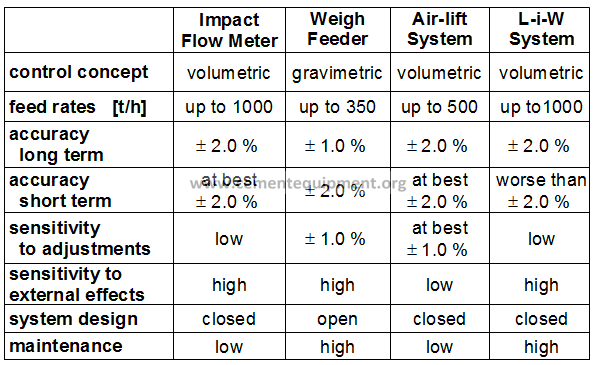
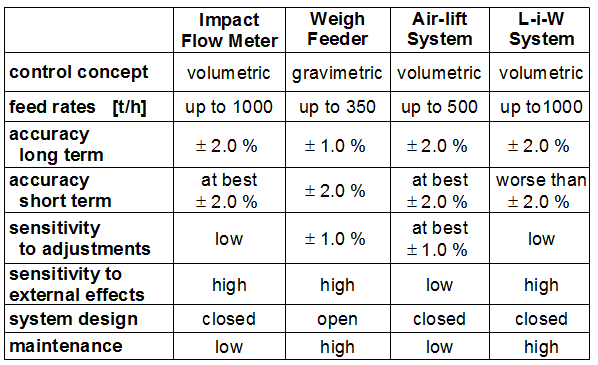
A weigh-feeder belt that tracks sideways can create both mechanical damage and weighing error because the belt may rub skirts, the weigh bridge or structure, while changing tension and force distribution through the weighing zone. Diagnose the mechanics before recalibrating: record where the belt moves, inspect idlers and pulleys, check loading symmetry and buildup, verify belt tension and frame alignment, then confirm the load cell and weigh bridge remain mechanically free. Calibration cannot compensate for a belt that is rubbing or pulling sideways through the weighing section.
Restore stable belt tracking and accurate weighing without using calibration factors to hide mechanical interference.
Use belt position, edge/rub marks, idler and pulley alignment, loading pattern, tension, zero drift, load-cell freedom, motor current and material test results.
Correct loading, alignment, buildup or tension first; recalibrate only after the belt and weighing structure are mechanically stable.
Fast diagnostic order
- Classify the mistracking: determine whether the belt drifts empty, loaded or once per belt revolution.
- Check the loading source: verify chute flow, skirts and material bed are centered before adjusting idlers.
- Inspect the mechanical tracking path: pulleys, idlers, buildup, splice, frame and take-up condition.
- Protect weighing accuracy: confirm the belt and skirts do not touch the weigh bridge and load cells/cables remain mechanically free.
- Calibrate only after mechanics are stable: verify repeatable zero first, then material-test accuracy at representative feed rates.
Record where mistracking begins and whether it affects zero
Capture: belt position at head, tail and weighing zone; whether drift appears empty or loaded; direction of drift; material loading pattern; visible edge/rub marks; belt tension or take-up condition; pulley and idler buildup; weigh-bridge clearance; zero-calibration trend; feeder speed; motor current; and whether error changes with feed rate.
If zero becomes unstable at the same time the belt moves sideways, mechanical contact in the weighing zone is a primary suspect. Preserve that evidence before adjusting tracking or calibration.
1. Determine whether the belt mistracks empty, loaded or both
A belt that runs centered empty but shifts under material often has a loading or skirt-force problem. A belt that is off-center even when empty points more toward pulley/idler alignment, frame geometry, belt splice, tension or buildup. Observe several revolutions because some splice or carcass problems repeat cyclically. Do not start adjusting multiple idlers until the condition is classified.
2. Inspect loading symmetry and inlet chute condition
Material should enter the feeder in a controlled, centered stream consistent with the design. A side-loaded bed pushes the belt laterally and also changes the load distribution over the weigh bridge. Inspect chute buildup, gate position, flow asymmetry and skirt condition. If product accumulates on one side, clean and correct the source before using idler adjustments to force the belt back toward center.
3. Check pulleys, idlers and buildup
Inspect head and tail pulley surfaces for material buildup, uneven lagging, contamination and axial position. Check idlers around the weighing zone for freedom, alignment and uniform height. A seized or tilted idler can steer the belt. Material packed on one pulley side changes its effective diameter and can cause persistent drift. Clean and repair before making tracking corrections.
4. Verify belt tension and take-up condition
Incorrect or uneven tension can make tracking unstable and can also change how the belt rides across the weigh bridge. Inspect take-up travel, adjusters, guides and any signs of binding. Check that left/right adjustment is not being used to compensate for a frame or loading problem. Follow the feeder manufacturer’s tensioning method; excessive tension can transmit unwanted force through the weighing system and accelerate belt or bearing wear.
5. Confirm the weigh bridge and load cells are mechanically free
The weighing section must respond only to the intended vertical material load. Inspect clearances between the belt, skirts, bridge, structure and cabling. Confirm load-cell mounts are not side-loaded, constrained by rigid cables or packed with material. Look for witness marks where the belt edge or a skirt has contacted the weighing structure. A constrained load cell can produce repeatable but incorrect results that calibration temporarily masks.
6. Check splice, belt condition and frame geometry
Inspect the belt splice for squareness, thickness difference or damage. A skewed splice can create a repeating lateral movement once per revolution. Review feeder frame, pulley supports and weigh-idler mounting for distortion or movement after maintenance. If a structural change occurred before the tracking problem began, restore geometry before tuning idlers.
7. Recheck zero and material accuracy only after mechanics are stable
Once the belt runs consistently and no rubbing or external force remains, perform the feeder’s normal zero verification. If zero is repeatable, proceed with span or material testing according to the existing calibration procedure. If the feeder still shows rate-dependent error, investigate belt speed, loading profile and weighing-system calibration. Mechanical repair and metrology verification are sequential steps, not alternatives.
Weigh-feeder mistracking diagnostic matrix
| Observed pattern | Likely direction | Priority check |
|---|---|---|
| Centered empty, drifts loaded | Asymmetric loading / skirt force | Chute, gate, skirts, material bed position |
| Drifts empty and loaded | Pulley/idler/frame/tension issue | Pulley buildup, idler alignment, take-up, splice |
| Zero changes when belt touches one side | Weigh-zone interference | Bridge clearance, skirts, load-cell side load, cable freedom |
| Lateral movement repeats once per revolution | Splice/belt carcass issue | Splice squareness, belt damage, thickness variation |
| Tracking stable but material test still wrong | Calibration/speed/load issue | Zero/span, belt speed, material test reference, loading profile |
Common mistakes
- Recalibrating repeatedly while the belt is still rubbing the weighing structure.
- Adjusting many idlers at once and losing cause-and-effect.
- Using belt tension to compensate for side loading from the chute.
- Ignoring buildup on a pulley because the belt eventually returns to center.
- Accepting a stable zero without checking material-test performance after mechanical repair.
Return-to-service verification
Run the feeder empty and through representative feed rates according to site procedure. Acceptance means the belt remains consistently centered through the weighing zone, there is no rubbing or external force on the weigh bridge, zero checks are repeatable, motor current and belt speed are stable, and the final material test meets the plant/OEM accuracy criterion. Record the repaired belt position and zero/material-test results as the new baseline.
Frequently asked troubleshooting questions
Can weigh-feeder belt mistracking cause weighing error?
Yes. Sideways movement can create rubbing, change force distribution through the weighing zone and side-load the weigh bridge or load cells.
Should the feeder be recalibrated before fixing mistracking?
No. Correct loading, belt tracking, tension, buildup and weigh-zone interference first. Calibration cannot compensate reliably for mechanical rubbing or side load.
What if the belt tracks correctly but the material test is still wrong?
Then investigate zero/span stability, belt-speed measurement, loading profile, reference test accuracy and the weighing electronics rather than continuing mechanical tracking adjustments.
Related Infinity technical guides
References
Use the installed weigh-feeder manufacturer’s mechanical alignment, load-cell installation, belt tension and calibration procedures. Final accuracy acceptance should follow the plant’s validated calibration and material-test standard.